
Noma vs Hive Inspect WDO
Finish and send WDO reports from Noma's mobile app, before you leave the property.
Less paperwork. More property. Edit findings, photos, work authorizations, and chemical notices in Noma’s mobile app. Then send the full WDO report before you leave the property. No browser or computer needed.
Comparing Noma and Hive Inspect? Here’s how the tools stack up, what they cost, and where Noma can give your team a head start.
Feature

Hive Inspect
Pricing
From $70/member/mo
$99/mo for first member
$69/mo per added member
Monthly plan; annual rates available
Edit and send full reports in the mobile app
✅ Yes, including chemical notices and work authorizations
⚠️ NPMA-33 reports
Advanced training
✅ Included with Enterprise
⚠️ One-on-one onboarding and support
Find saved clauses by voice
✅ Yes
✅ Yes, Smart Add voice matching
Clients choose WDO repairs online
✅ Yes, choose items and sign
⚠️ Repair request builder
Published pricing
✅ Yes, on our website
✅ Yes, on its website
Multi-year contract
✅ Month-to-month
✅ Monthly option; cancel before renewal
Same-day setup
✅ Yes
❌ Not listed
AI diagram drafts
✅ Yes, editable drafts
❌ Not listed
Fill findings and prices by voice
✅ Yes
⚠️ Spoken findings; price entry not listed
AI grammar cleanup
✅ Yes
⚠️ AI rewrites from comment names
AI exterior finish detection
✅ Yes, from property photos
❌ Not listed
Multiple inspectors, same report
✅ Yes, work at the same time
⚠️ Shared report; sync to see team edits
Invoice selected signed repairs
✅ Yes
⚠️ Service invoices; repair link not listed
Supports all 50 states
✅ Yes
⚠️ NPMA-33, FL WDO and TX WDI
Diagram editing
✅ Yes
❌ Not listed
Online work authorizations
✅ Yes, sign from a link
⚠️ Online inspection agreements
ACH payments
✅ Yes, secure payment link
✅ Yes, through Stripe
Offline fieldwork
✅ Yes
✅ Yes; AI needs internet

Migrating from Hive Inspect to Noma is easy
Our team can help you migrate from Hive Inspect to Noma, for free, so you can keep focusing on your customers.
Learn more about migrating to Noma.
Keep more of what you earn
Your work earns the revenue. Keep more of it with bank payment fees of 1.95% through Noma.
At $110,000 in monthly payments, processing at an example card rate of 3.5% costs $3,850. If clients pay that same volume by bank with Noma, processing costs $2,145.
In this example, you keep $1,705 more each month. That’s $20,460 a year back in your business, from the same work.
Spend less on your software
Noma Core starts at $70 per member per month on yearly billing. That’s $840 per member, paid for the year.
Monthly plan; annual rates available, Hive Inspect costs $99 per month for the first member, then $69 per month per added member. For 5 members, that works out to $4,500 a year, compared with $4,200 for Noma. You keep an extra $300 each year.
Look at the work behind the price, too. Noma brings diagram drafts, voice findings, client repair choices, and invoices into one WDO workflow. Your team spends less time moving the same details from one step to the next.
Core yearly
$70
per member / month
$840 per member, billed yearly.
Full inspection platform
Scheduling, public booking, and CRM
Mobile fieldwork, reports, and comment library
E-sign, invoices, and payments
Team tools as you add people
Enterprise
Custom
For larger teams that need a guided rollout.
Everything in Core
Shared Slack channel
Personalized onboarding
Volume discounts
How much could you save?
See what your team could save.
5 members
$300
yearly savings
Noma$4,200/year
Hive Inspect$4,500/year
Hive Inspect: $99 per month for the first member, then $69 per month per added member. Monthly plan; annual rates available. Noma billed yearly.
When Hive Inspect might be the better fit
Hive Inspect may fit a home inspection business that adds WDI reports to its main work. It has NPMA-33, Florida WDO, and Texas WDI forms, plus spoken comment matching, AI writing, offline reports, and online booking.
Its pay-per-report option can suit a light workload, and extra inspectors cost less than the first seat. For team jobs, inspectors must sync and reopen the report to see each other’s changes. Compare that daily handoff, along with how clients choose and approve priced repairs, before deciding which workflow fits.
If WDO work is at the heart of your business, start with Noma. Draft the diagram, speak your findings, and let clients choose and sign for the repairs they want. Then invoice the work they approved. With support for all 50 states, published pricing, and help getting set up, Noma gives your team one place to carry the job forward.

“Three months in, I couldn’t be happier with my decision to switch to Noma. Noma is a great tool for inspections, and the support from the team is invaluable!”
David Padilla, Senior technician
Switched to Noma 2026
Your day shouldn’t end at the keyboard
You’ve been under the house, up in the attic, and out on the deck. The last thing you want is another shift at the kitchen table. Noma helps you get the details down while they’re fresh, so the report doesn’t have to take over the rest of your day.
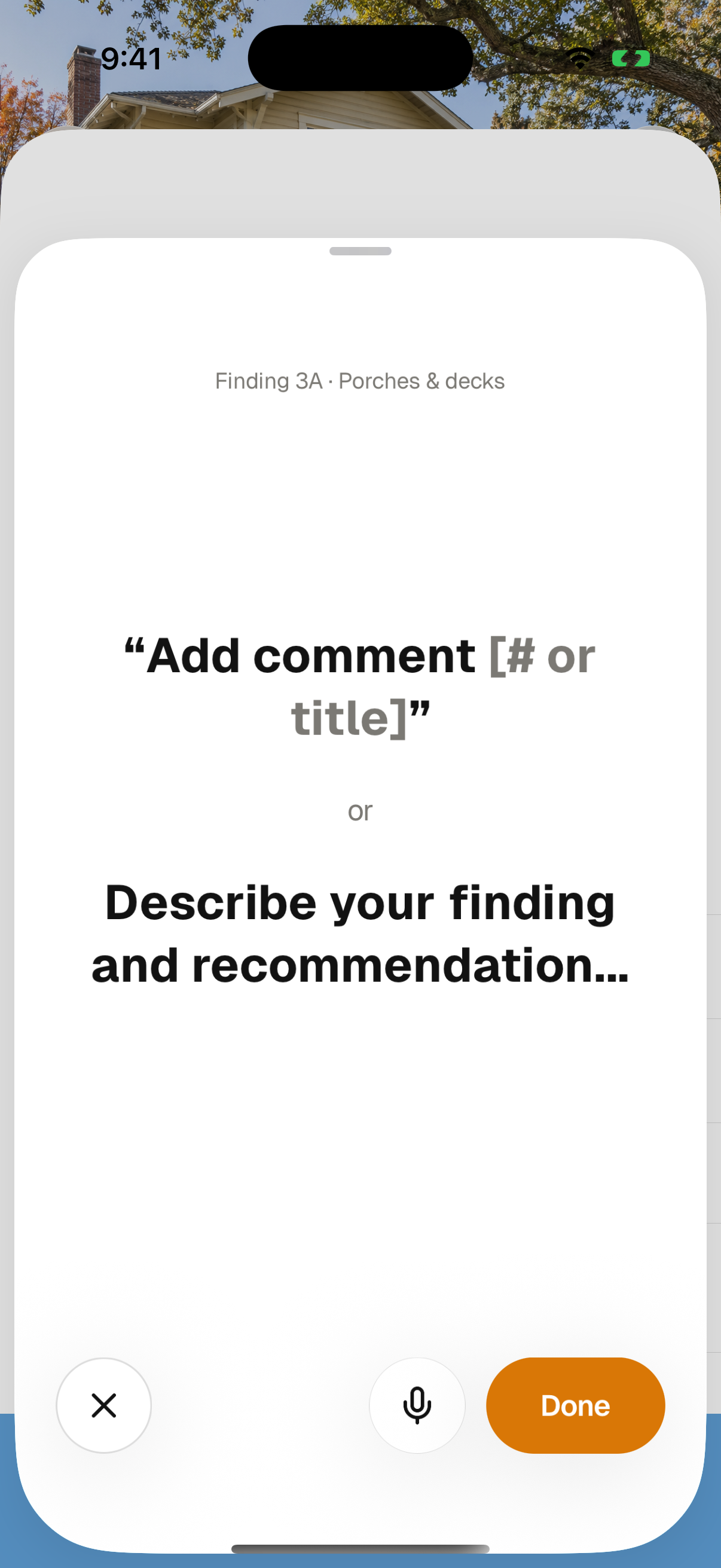

Found it? Say it. Describe the damage, where it is, what needs to happen, and the price. Noma turns your words into a finding and recommendation, ready for you to check.
“Dry rot at the rear deck. Replace the damaged wood. Twelve hundred dollars.” Your judgment does the important part. Noma helps with the typing.
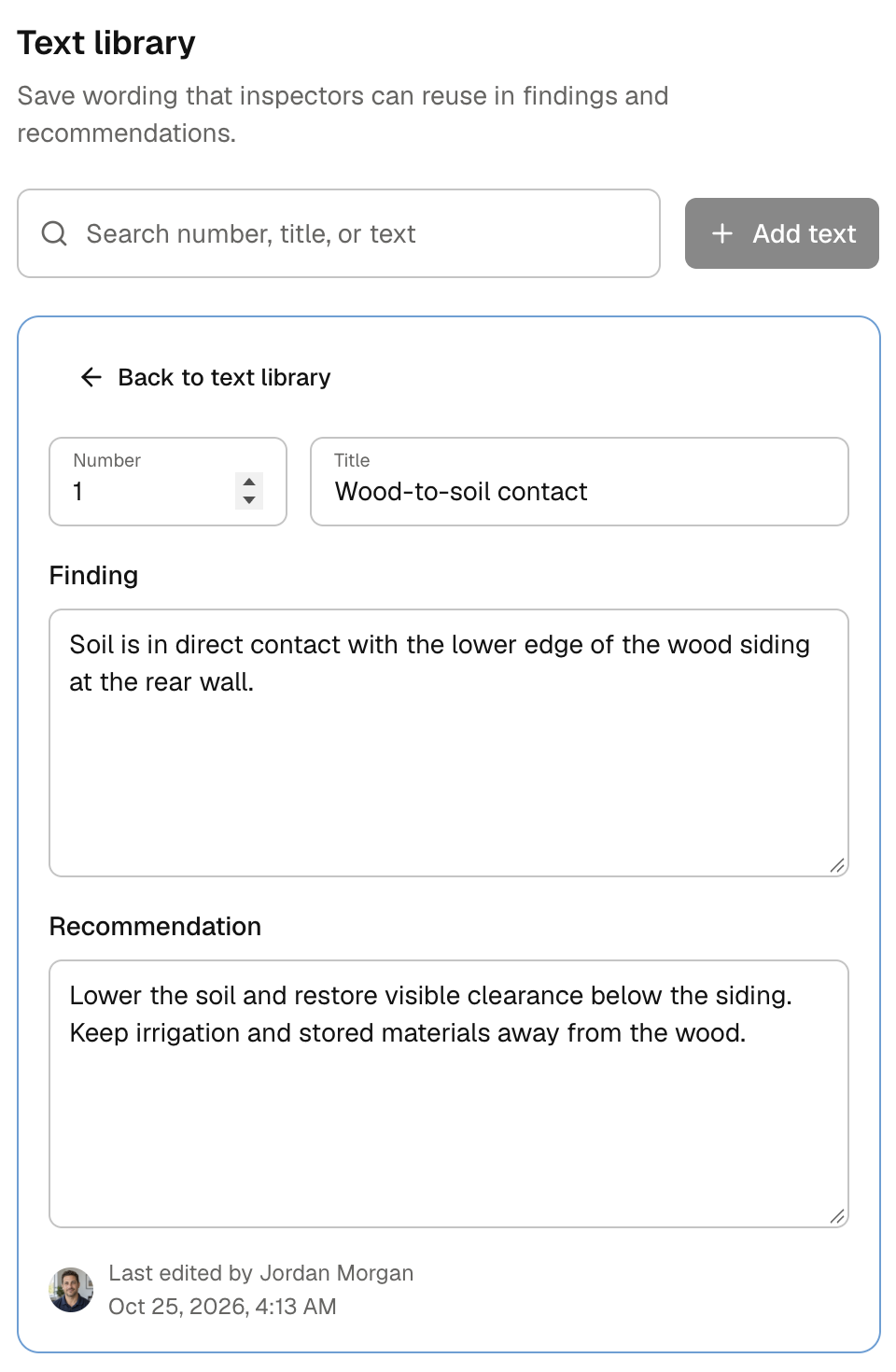
You’ve already found the right words. Keep them. Save the findings and recommendations your team trusts, then ask for an entry by number or title when you need it.
Add the details that make this property different. When fieldwork is done, Noma AI can clean up grammar and punctuation for your review. A little less rewriting. A report that still sounds like you.
A clearer picture of what you found
“At the rear of the property” can leave a lot to the imagination. A good diagram makes the report easier to follow, for your team and for the homeowner trying to understand what comes next.
Noma AI can prepare an editable starting diagram from available property evidence. Check it against the building, adjust the walls, porches, and stairs, then place your findings right where they belong.
The drawing and the finding stay connected. Your markers link back to the report, so people can see what you found and where you found it. Less explaining the same thing twice. More confidence that everyone is looking at the same thing.
Help homeowners take the next step
A homeowner shouldn’t need to become an expert in your software to understand your report. Or find a printer to get the work moving. With Noma, they open a link, review your findings, and choose the repairs they want you to carry out.
Photos, recommendations, and prices are close at hand. They can look through the details, see their selected total, and sign the work authorization in their browser. No Noma account needed.
It’s a small thing to make someone’s next step feel simple. When they’re making decisions about their home, it can mean a great deal.
Good work deserves a shorter path to getting paid
You wrote the recommendation. Your client approved it. Now it’s time to bill the work, and all those details are already there.
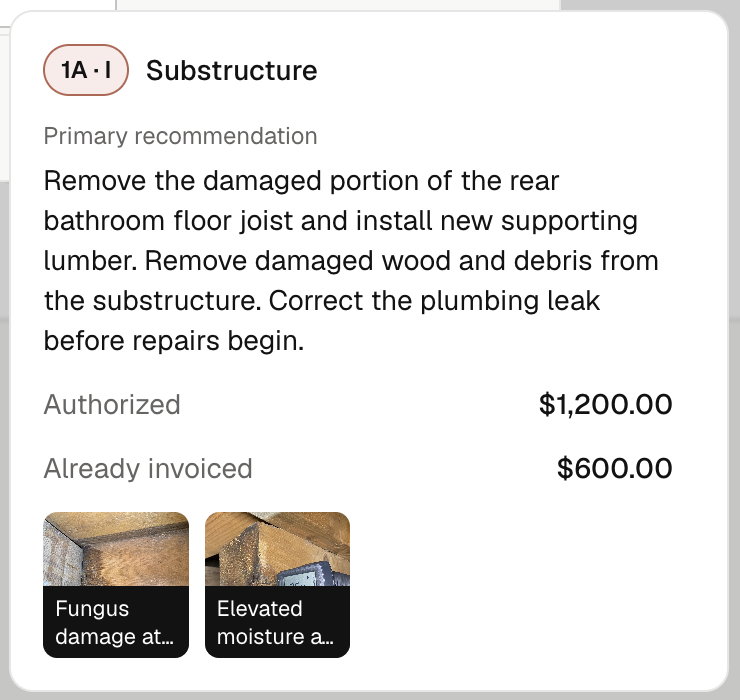
In Noma’s web app, build your invoice from the signed WDO work. Check the scope, photos, and agreed price without digging through old emails or typing the recommendation again.
Bill part now and the rest later. See what’s already been invoiced and what’s left. Review your bill, send it, and keep the whole story with the job.
An open calendar. One less phone call.
Someone is ready to book. You’re in a crawlspace. These two things shouldn’t have to happen at different times. Your Noma booking page lets clients choose an inspection, enter the property, and pick an available time without waiting for you to call back.
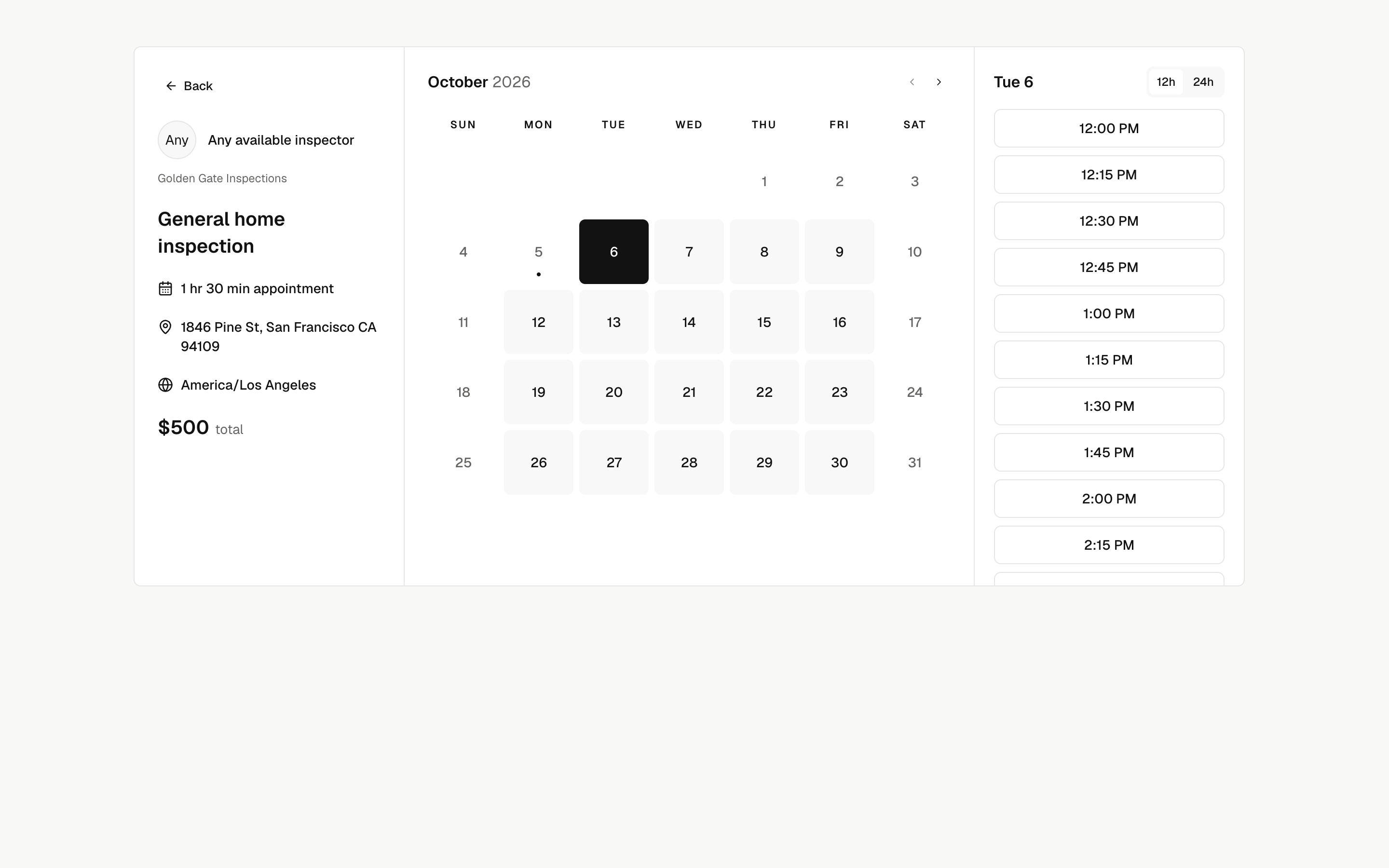
Set prices and visit times that fit your services, including rules based on square footage. Clients see the price as they book, or a clear note when it needs your review. If plans change, they can reschedule or cancel online within the rules you set.
You set the boundaries. They choose what works. A little more freedom for your customers, and a little more room in your day to look after them.
Frequentlyaskedquestions
One last thing you should know
Behind every report is a person who cares. An inspector looking closely. A team doing right by its customers. A homeowner making decisions about a place that means everything to them. We believe the tools behind that work should be worthy of it.
We’re building a lasting business that gives teams the freedom to do their best work and helps homeowners feel more confident in the places they call home. We’re in this for the long haul.

“For those of you still using old-school systems: why not use Noma instead? Is the comfort of what you know worth more than lower fees, less paperwork, and giving your team the freedom to do their best work?”
Burton Chen, Owner of East Bay Structural & Termite Co.
You’re now armed with knowledge! Hopefully this guide was useful in giving you a general overview of Hive Inspect compared to Noma.
We can help you migrate to Noma from your current software, for free! Save time and let the Noma team help you get set up; less hassle, less guesswork, and support along the way. Learn more about our migration service.
I used to finish my last inspection and start my second workday at the kitchen table. Noma gave me my evenings back. I still care about every detail. Now I can give my customers my best during the day and be there for my family when I’m home.

Bret Hustedpreventioninspection.com
Switching to Noma was the decision we kept putting off and now wish we’d made sooner. We were so used to working around our old software that we stopped noticing how much effort it took. Our team finally has tools that feel like they’re working with us.

Kelly Thayerharbourhomeinspect.com
The difference shows up in the way we take care of people. A clear report. An easy way to approve the work. Fewer things for a homeowner to chase. Noma helps us deliver the kind of experience I want our name attached to. That matters more to me than any feature list.

Tanner Christiankickout-termite.com